
SMS Marketing Update: Auto-Load Now Available for messages
Save time by setting up auto-reload for credits on your Pony Express Account, and never run out of your text message credits.

Dear Pony Express Riders,
We’re happy to introduce a new feature, suggested to us by you! Save time by auto-refilling your credits - no need to keep entering your payment information. Don’t worry about running low or running out of credits. With auto-load, you’ll never miss an incoming message because you’ll ensure your account always has credits. ¢¢¢
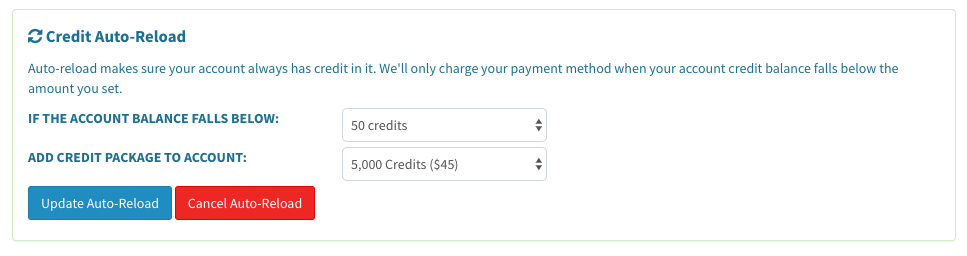
SMS marketing update: Don’t run out of credits! Auto-load SMS credits now available
How do auto-load SMS marketing credits work?
1. From the left-hand menu, go to your “Account Settings”
2. For first-time users, purchase a prepaid credit package
3. In the “Auto-Reload” section, tell us when you want to refill your credits, such as “when my account falls below 50 credits.”
4. Tell us how many credits you want to add to the account, such as “5,000 credits”
5. Click “Setup Auto-Reload” to save your settings
Can I change and/or cancel my Auto-Reload settings?
Yes! Simply go to Account Settings and update or cancel your Auto-Reload settings at any time in the “Credit Auto-Reload” section.
Why should I set this up?
If your account is out of credits, you won’t be able to receive incoming messages, and you won’t be able to send outgoing SMS marketing messages either. Credits keep your Pony Express account running.
Log In to your Pony Express HQ dashboard
Are there any other ways we can help you and your team run smoothly?
Discover: What is the point of a business phone number? ☎️
Good luck with your SMS marketing campaigns!
Happy Texting ✨